A pretty front, but KDP needs a wrap
Back, spine and front at the right size
Paperbacks need one file with all three panels. The book cover maker builds it from your trim, paper and page count, with bleed on every side.
Make a book cover online without a design app. Describe your book, then edit the title, author, back copy, layout and colors yourself, and download a print-ready KDP wrap cover and a Kindle cover.
Free to start. No card needed. Your editor answers in seconds.
A pretty front, but KDP needs a wrap
Paperbacks need one file with all three panels. The book cover maker builds it from your trim, paper and page count, with bleed on every side.
The spine width is a guess
The spine uses the same per-page thickness KDP publishes for each paper. Change the page count and it resizes.
Stock templates look like everyone else
The front scene is made from your own description, in the style you ask for, so no other author has the same cover.
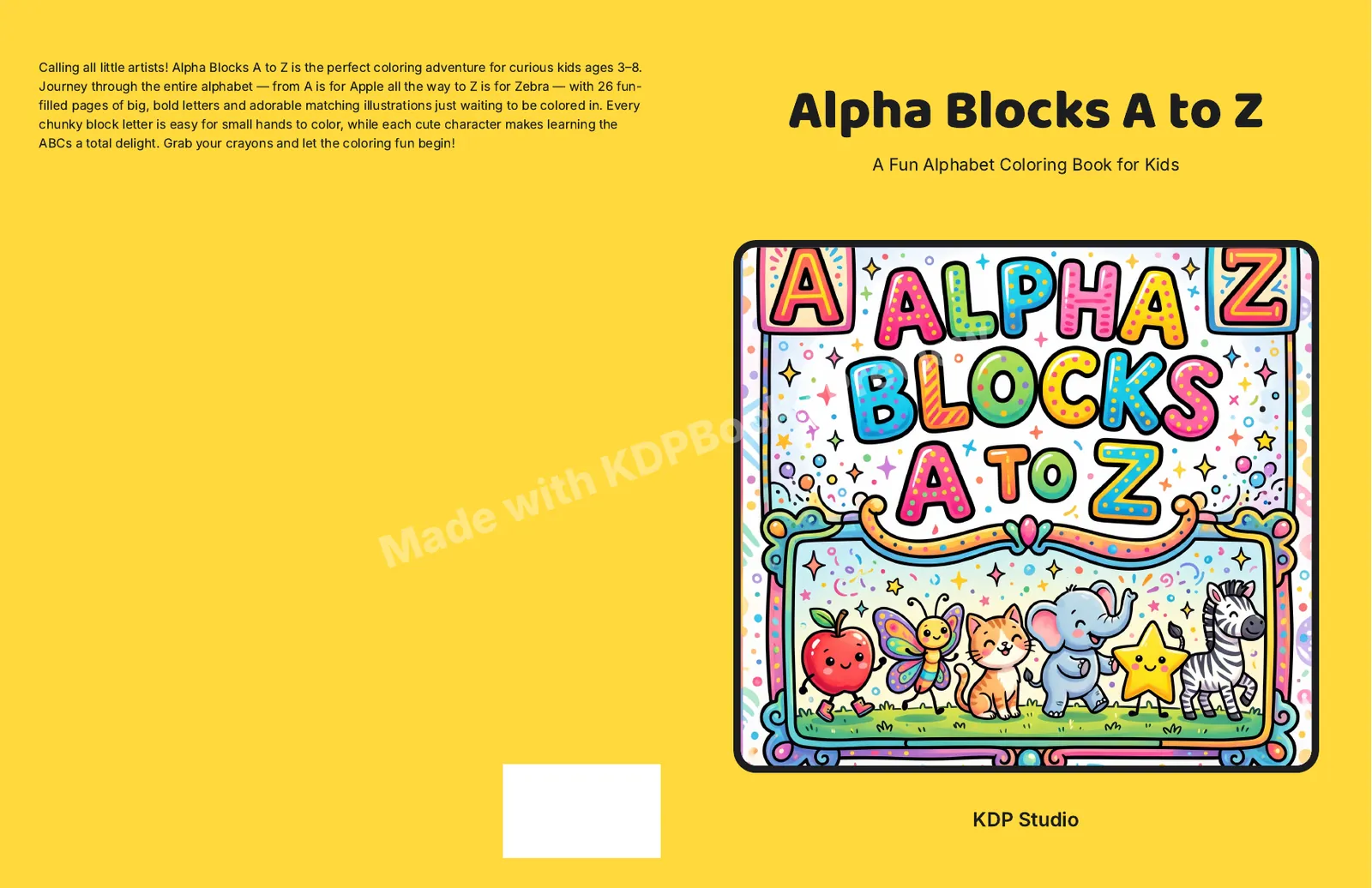
Alpha Blocks A to Z, an alphabet coloring book made in KDPBook: 8.5 × 11 in, 56 pages, white paper. The wrap is 17.3761" × 11.25" with a 0.1261" spine. This is a free-plan export, so it carries the watermark.
All of these sit on one cover page in the studio. Only new artwork costs credits; every other change is free and shows up straight away.
Type them and the cover updates. They are set as real text, so spelling and size never depend on the artwork.
Shown on the front and, when the book is thick enough, on the spine.
Defaults to title and author. KDP only allows spine text from 80 pages, and the field tells you when the book is too thin.
Write it yourself or let the editor draft it from your description. A space for the KDP barcode stays clear.
4 layouts for where the title and artwork sit. Switching is instant and free; the art is not redrawn.
Pick any color for the back, spine and layout panels, or leave it on Auto for the layout’s default.
Describe the scene and it is drawn to fit your layout. Not right? Redraw it for 30 credits, with a note on what to change.
13 KDP trim sizes and every paper type. Change them and the spine and full wrap resize on the spot.
Title, author, genre and what it is about. The editor drafts back cover copy and plans the front scene.
Trim size, paper and the page count of your interior. Not sure yet? Change it later.
60 credits for the cover, charged only when it is delivered.
Adjust text, layout and color, then download the wrap PDF, the Kindle JPG and an upload checklist.
Example: a 6 × 9 in paperback with 240 pages on cream paper needs a 12.85" × 9.25" wrap with a 0.6" spine. Check any size with the cover size calculator. Want the AI to do more of the design? The AI book cover generator page explains how the artwork is made. Prefer to design by hand? Start from a cover template generator file and our cover design rules.
Yes, you can start free. New accounts get free credits, a new cover costs 60 credits, and editing text, layout or colors afterwards costs nothing. Free-plan exports carry a "Made with KDPBook" watermark; paid plans export clean files you can sell.
Not as the cover image itself yet. You can attach an image as a reference, and the cover is drawn in its palette, medium or composition. If you already have finished artwork, the free KDP cover template gives you a guide file at the exact size to design on.
Not yet. A cover made on its own uses a classic serif that works for any genre; a cover made with a whole book uses type matched to the kind of book, such as a rounded face for children’s books. There is no font picker or drag-and-drop canvas; the trade-off is a cover that always fits KDP margins.
Yes: thrillers, romance, horror, fantasy, nonfiction, children’s books, coloring and puzzle books. Describe the mood and the genre and the artwork follows it. Comic-style art works too, though there is no comic book interior maker yet.
The wrap PDF is built at the exact size KDP asks for from your trim, paper and page count, with 0.125 in bleed and a 2 × 1.2 in barcode area kept clear. If your final page count changes, change it here and export again before you upload.
Yes. Every cover also exports a 1600 × 2560 pixel JPG for the Kindle ebook. Ignore the print PDF if you do not need it.
Yes. KDP asks whether your book contains AI-generated images, and an AI-drawn cover counts. The upload checklist in your download tells you how to answer.
Describe your book, edit every line, and download a KDP wrap cover and a Kindle cover. Start free.
Make my cover